
Client's account
The personal account allows the client to independently manage data, make purchases and submit requests through forms, track the status of orders, update information and access company resources, relieving the burden on managers and ensuring convenience and customer satisfaction.
Who will benefit from it?
Services sector
Freelance
Business consulting
Tool usage scenarios
Reduce the workload on your team
The client will not have to contact the support service for help, but will be able to independently familiarize themselves with the necessary information, place an order, or perform targeted actions.
Keeping the client's attention
Send out news about new products, promotions and other news items
Encourage repeat purchases
Offering bonuses and discounts for repeat purchases encourages customers to return again and again
Show a special approach
The presence of a personal account demonstrates a step towards the client, providing them with a personalized experience of interacting with the platform
To warm up interest
Using newsletters, mailings, announcements, and email chains to maintain customer interest and inform them of new offers and updates
Increase loyalty and engagement
Implementing game mechanics such as badges and rewards to increase customer engagement and motivation
How does this work
Your personal account is the place where your management systematically interacts with members of the organization.
http://yoursite.com
Managers
Управляют контентом, настраивают рабочие области и сценарии, взаимодействуют с посетителями, работают во встроенной CRM
Users
Попадают в кабинет по приглашению менеджера, после регистрации или после первой покупки
Tools
Shop
A tool for selling physical goods and services
Tariff plans
A tool for organizing pricing plans for your product
My orders
A section in which the user has access to all of his product orders, subscriptions, orders via the shopping cart, and applications via forms
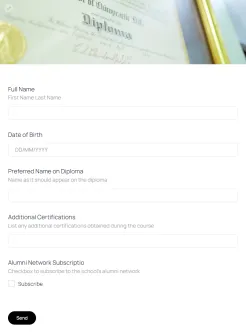
Forms
Collecting user data and entering it into the CRM. Forms can be published in the dashboard and on the company's main website.
Forms
Collecting user data and entering it into the CRM. Forms can be published in the dashboard and on the company's main website.
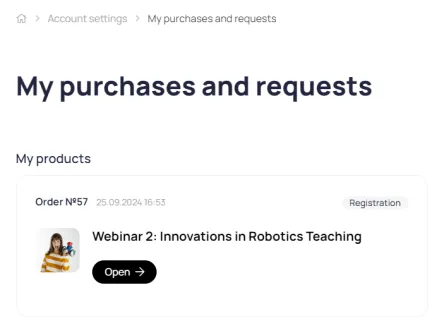
My orders
A section in which the user has access to all of his product orders, subscriptions, orders via the shopping cart, and applications via forms
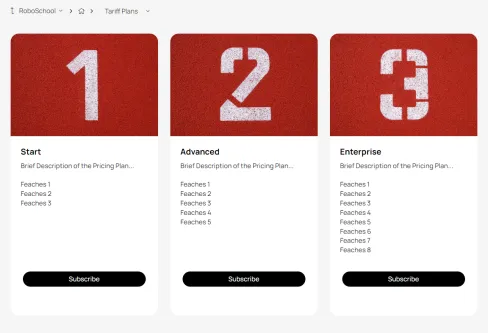
Tariff plans
A tool for organizing pricing plans for your product
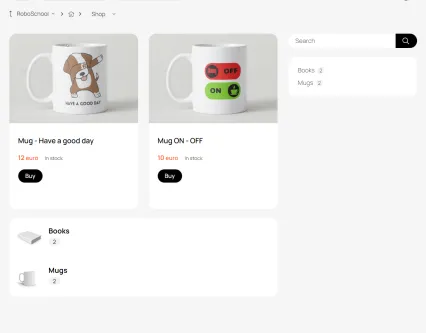
Shop
A tool for selling physical goods and services
Let's look at what actions the client and the company's managers can take.
The platform provides interaction between administrators, teachers and students
Client
Submitting requests via forms Tracking the status of requests Subscribing to a tariff plan Purchasing goods and digital products Accessing resources (knowledge base, articles, videos, documents, files, etc.) Accessing documents (invoices, instructions, checklists, etc.)
Sales Manager
Order processing, maintaining a client base in CRM, issuing invoices and other documents, publishing documents in the client account
Help Desk Manager
Processing customer requests through forms Correspondence with customers within the framework of applications Recording requests in CRM
Marketer
Newsletter Event Announcements Bonus Program Gamification Loyalty Program
Content Manager
Filling your account with content: Knowledge base, articles, videos, downloadable files
Built-in CRM
Maintain a database of contacts and transactions, post invoices and other documents in your user account
All data about clients and their orders is automatically transferred to the built-in CRM
Documents
A repository for files and records related to clients and transactions. Documents can be published in the user's personal account.
Contacts
The contact card automatically collects information about purchases, requests via forms, correspondence history, and current tasks.
Transactions
The deal includes all information related to the process of selling support and recruiting, from the initial contact to the completion of the business process.
Funnels
A tool for tracking and managing customer interactions at all stages. It visualizes the customer journey from initial contact to completion of the transaction and adapts to various types of interactions.
Lead generation
Organize work with incoming requests from potential and current clients
Customizable application forms, lead magnets, and an incoming application processing module. Now incoming applications won't get lost.
Forms
Collecting user data and entering it into the CRM. Forms can be published in the dashboard and on the company's main website.
Lead magnets
A tool for collecting contact information from potential clients. It can be implemented using several tools (article, course, video, knowledge base, event). Simply enable access after registration and configure the registration form.
Application processing module
This module collects all applications sent through forms.
Onboarding
Support newcomers
Protect new users from information overload during their first visits to the dashboard and guide them through the necessary steps for a successful start. This will help reduce the number of recurring support requests.
Welcome block
Displayed upon first visit to the account. After reading, it can be hidden by the user.
Starting checklist
A list of items with a completion mark recorded in the CRM on the contact card
Email chains
A set of pre-prepared emails sent to the user automatically after a certain period of time
Tools
Fill your personal account workspace with a variety of content
Each format has unique features that will help you effectively solve your business problems.
News
News feed on the main page of the account, quick newsletter distribution to the client base
Events
Webinar and offline event announcements, invitation distribution, registration and payment lists
Files
Publish files for download with flexible visibility settings and the ability to set up paid access
Courses
Homework, stop-lessons, group and individual schedules, convenient text editor
Knowledge bases
A collection of articles and files with flexible structure and full-text search
Video
Publish videos with flexible visibility settings and the ability to set up paid access
Monetization
Use different payment formats to sell digital products
After payment, the user instantly gains access to the product, and their data is automatically entered into the CRM
Tariff plans
A tool for organizing pricing plans for your product
One-time payment
After payment by card, the user is automatically granted access to the paid digital product
Payment in installments
The administrator can split the invoice for a digital product into several parts and send the client a payment link.
Regular payments
When purchasing a product for the first time, the user links their payment card. The platform then automatically debits the specified amount after a set period of time.
Shop
Sell physical goods and services
Customers can add items to their cart and then place their order or pay online. All orders are automatically recorded in the integrated CRM.
Shop
A tool for selling physical goods and services
Dealership store
Managing prices for different user segments
Gamification
Motivate
Help clients define their goals and inspire them to achieve them
Personal counters
A universal tool for displaying a user's personal balance in their account
Badge
A badge is a distinctive symbol (status, rank, etc.) that a user sees under their name in their personal account.
Payment with bonuses
You can pay for a course, knowledge base, file, event, or membership in a subscription club with bonuses.
Automation
Automate routine processes
Automated actions are a powerful tool for marketing, customer retention, and optimizing time spent on repetitive actions.
Auto-actions
Send emails, award points, subscribe to email chains, create deals and tasks, and automatically transfer users to another segment.
Email chains
A set of pre-prepared emails sent to the user automatically after a certain period of time
Letter templates
Letter templates that can be sent to platform users
Account
Allow users to independently manage their data and track the status of orders
A personal account section with a set of tools for managing personal data, tracking the status of submitted requests and completed purchases
My PRO orders
A section of the personal account for interaction between the manager and the client during order fulfillment
My orders
A section in which the user has access to all of his product orders, subscriptions, orders via the shopping cart, and applications via forms
Password recovery
If a user forgets their password, they can recover it themselves without having to contact support.
Name and photo
The user can upload their own photo and crop it if necessary.
Login and password
The user can independently change his password and registration e-mail.
Languages
Users can select the language for their personal account's user interface. We are constantly expanding the list of supported languages.
Design
Combine your website and personal account into a single unit
Set up your own domain and design your personal account in your brand colors. Users will perceive the site and personal account as a single, unified space, building trust and loyalty.
Favicon
A website or page icon. Appears in the browser tab before the page title.
Logo
Placed on the login page, on the registration page and in the HERO block on the main page of the account
Own domain
The platform can run on any domain or subdomain, working seamlessly with your website.
Colors
Design your account in the colors of your main website to create a unified information space
Faster than competitors
Ready-made tools allow you to start working immediately, without developing and maintaining infrastructure
Quick start
Ready-made tools allow you to begin implementation today, saving time and money on programming.
No infrastructure costs
No server support costs allow you to focus on business tasks rather than technical issues
Fast, reliable, technologically advanced
Focus on growing your business and leave the technical issues to us.
Please leave any technical questions to us.
No special knowledge required
A simple and user-friendly interface allows you to work without involving your own programmers and designers.
Help at the start
We will help you implement the solution you need using the platform's capabilities.
Data protection
Data backup and cloud technology ensure the safety of your data
24/7 access
We work 7 days a week, 7 days a week, and 365 days a week, anywhere on planet Earth.
Works on all devices
The Office workspace adapts to the size of your device.
Responsive support
We respond within an hour on weekdays and within 3 hours on weekends.