
Case
IT-UNIVER
How a children's educational project united students, parents, teachers, and administrators in a single system—without the clutter of spreadsheets, emails, and manual control.

During a period of active growth, the IT-UNIVER team faced a typical problem of an educational project: the number of processes increased, but their management remained fragmented.
Email newsletters were sent separately, the student database was maintained in Excel, the course materials were in a course service, and the documents were in Google Drive. Some information was kept in the minds of administrators and teachers.
While the school was small, this approach worked. But as the number of students, groups, teachers, and payments grew, manual operations began to hinder development. The team needed a unified system that would integrate learning, communication, payments, attendance, and administrative controls.
Challenge for business
The team needed to eliminate the chaos of spreadsheets, newsletters, and individual services and consolidate the school's work into a single platform. To achieve this, the team chose theCabinet.io and its "Student Account" solution.
Stages of implementation
Step 1
We analyzed the processes and roles
During working meetings with the team, we identified 4 user groups and tasks that needed to be linked into a single system.
Administrators
Maintain a database of students
Monitor attendance
They are creating a schedule
Communicate with students and parents
Launch service and marketing mailings
Teachers are paid
New teachers are being recruited
Monitor attendance
They are creating a schedule
Communicate with students and parents
Launch service and marketing mailings
Teachers are paid
New teachers are being recruited
Teachers
Preparing educational materials
Checking homework
They see their groups and schedule
Communicating with students
Monitor learning progress
They see the accrued payment for lessons
Checking homework
They see their groups and schedule
Communicating with students
Monitor learning progress
They see the accrued payment for lessons
Students
Gain access to lessons
Doing homework
Communicating with the teacher
Receive messages from the administration
Pay for tuition online
Doing homework
Communicating with the teacher
Receive messages from the administration
Pay for tuition online
Parents
They pay for tuition
Receive reminders
Monitor attendance
They see the child's progress
Receive reminders
Monitor attendance
They see the child's progress
Step 2
Connected the team
Administrators and teachers have been given access to the platform to migrate workflows and prepare educational content.
Step 3
Transferred the student database from Excel
Student and parent contacts were imported into the CRM so that all interaction, payment, and tuition histories could be collected in one place.
Step 4
We customized the tools to fit the school's actual processes.
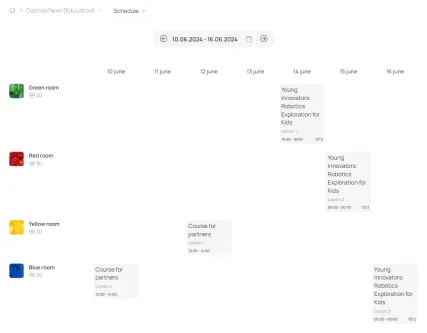
School schedule
Schedule of groups, lessons, teachers and classrooms in a single table.
Teachers' salaries
Automatic payment to teachers for classes taught.
Audiences
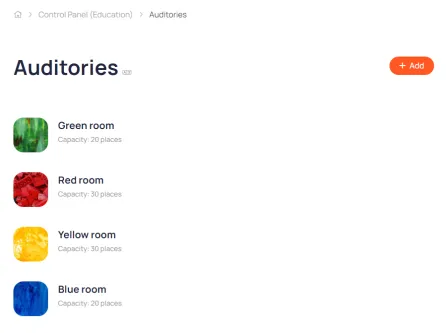
List of classes with the number of seats for correct formation of the schedule.
Courses
Lessons, homework, stop-lessons, group and individual schedules, materials and tests.
Attendance
The administrator records attendance at the lesson, and the system links attendance to the teacher's payment and the student's history.
Teacher's room
Teacher's workspace: courses, groups, homework, assignments, and teaching materials.
Next, how the platform works in the school's daily processes
The work of school administrators
CRM
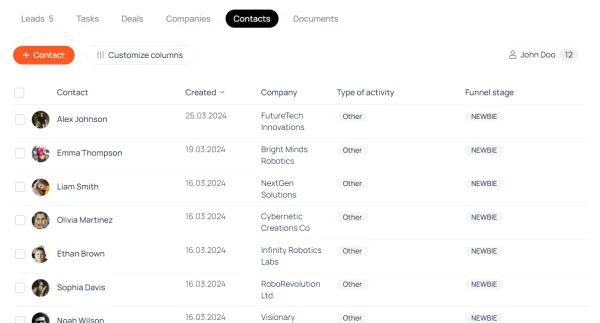
Unified database of students and parents
The CRM stores information on students and their parents: contacts, groups, payments, attendance, notes, and communication history. The administrator can quickly find relevant people and filter the database by work parameters.
Educational process
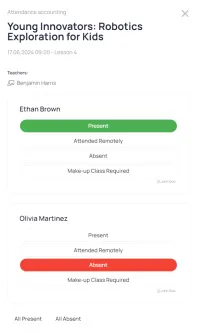
Attendance without paper lists
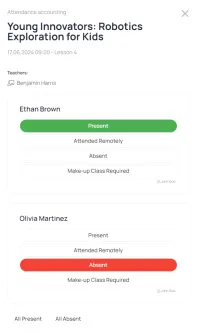
Before the lesson begins, the administrator opens the lesson on their smartphone and notes who has arrived and who is absent. The data is immediately entered into the system and becomes part of the student's history.
Contact card
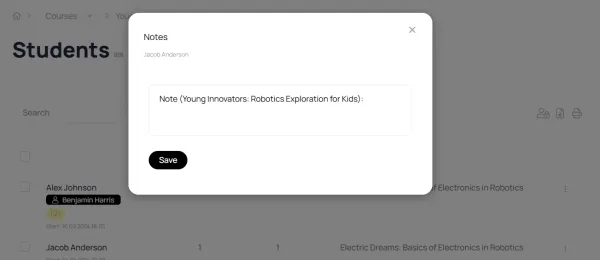
The contact card automatically collects all student information: payment status, learning progress, attendance, correspondence, administrator notes, and teacher testimonials.
Automatic payment to the teacher
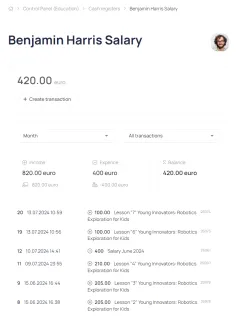
When the administrator marks the first student for a lesson, the lesson is considered completed. The system automatically charges the teacher at the set rate.
Teacher's room
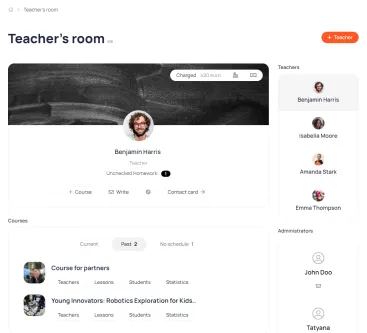
The administrator can see all teachers, their courses, payouts, and the number of unchecked homework assignments. New teachers can also be added and their workload monitored.
Monetization
Acceptance of payments for tuition
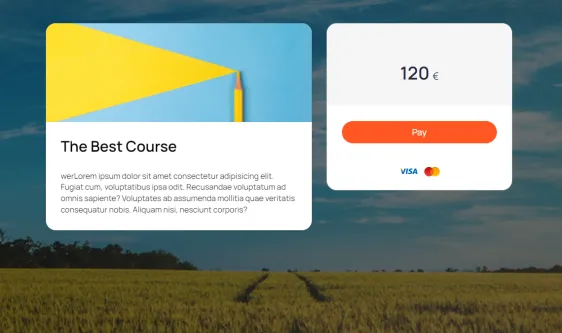
The school accepts payments in a variety of ways: online on the website, via a link, in installments, or in cash at the reception desk. All payments are recorded in the system.
Online payment
Some courses are available on the school's website. Students or parents can select a course and pay for tuition online without contacting an administrator.
Payment in installments
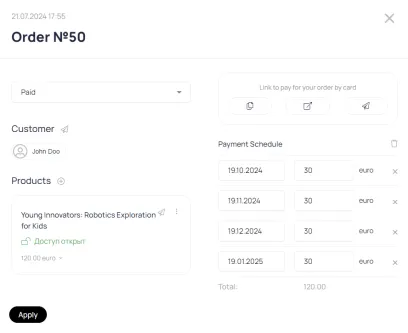
The manager can split the payment into multiple installments and set a schedule. The student or parent receives a clear payment plan and can make payments online.
Payment in cash
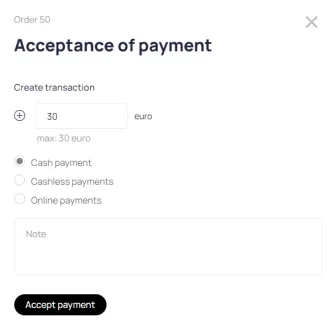
If a student pays tuition at the school, the administrator manually records the payment in the CRM. The payment information is then saved in the contact card.
Payment link
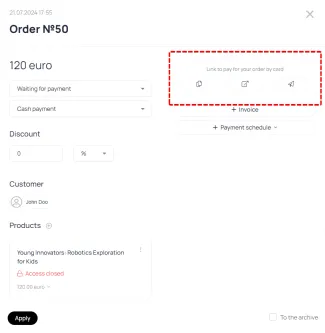
The administrator can generate a payment link and send it to the student or parent. This payment can be made online.
Calculation of teachers' salaries
The system links completed lessons, attendance, and teacher salaries to eliminate manual calculations and reduce the risk of errors.
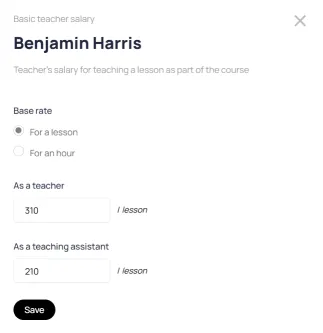
Base rate
For each teacher in the system, a base rate is set for the lesson conducted.
When the administrator marks attendance, the system automatically considers the lesson completed and transfers payment to the teacher's personal account.
Payments
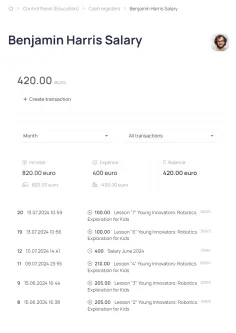
Once a month, the administrator processes the payment and records it in the teacher's salary project. The accrual and payment history remains in the system.
School schedule
The schedule helps connect groups, lessons, teachers, and classrooms—without having to keep this logic in separate tables.
Audiences
The number of seats is indicated for each classroom. This information is used when planning groups and classes.
Formation of the schedule
The administrator creates courses, specifies dates, class times, instructors, and classrooms. Based on this data, the system generates a schedule and alerts if a group has more students than the number of seats available.
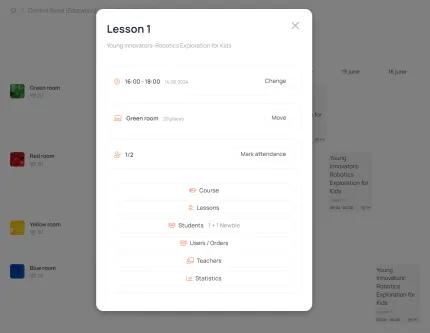
Working with lessons
The schedule displays information about each class: course, lesson, instructor, classroom, and attendance. Administrators don't need to collect this data from multiple sources.
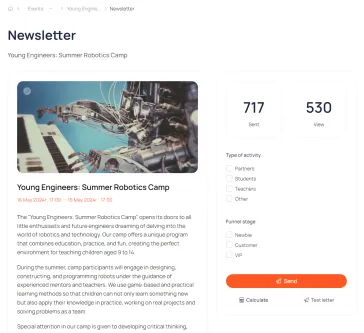
Events
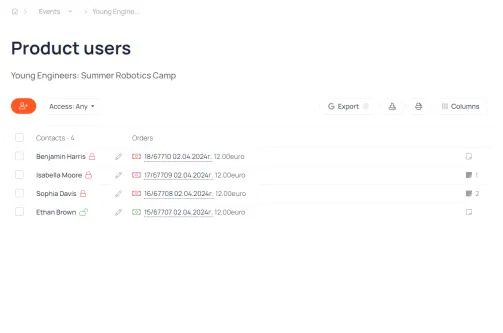
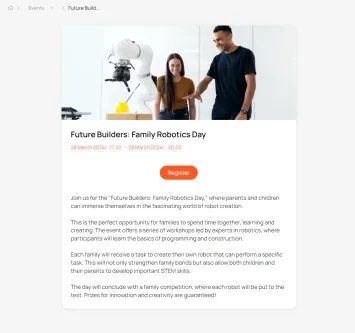
The school hosts master classes, lectures, and winter and summer camps. The platform helps invite participants, collect registrations, and accept payments.
Sending out invitations
The administrator creates an event and sends an invitation to the student database. There's no need to manually compile lists and send messages from various services.
Registration or payment
If an event requires pre-registration or payment, the appropriate button, either "Register" or "Pay," will be included on the event page.
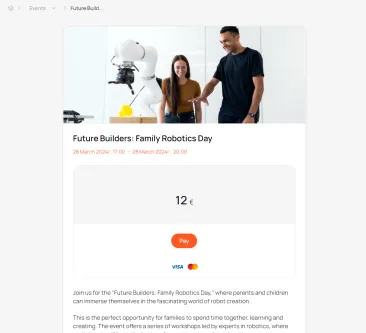
The list of participants is generated automatically. The administrator can see who has registered, who has paid for their participation, and who needs to be contacted further.
Automation
Routine actions have been transferred to a robot: the system itself monitors events and creates tasks for responsible people.
Calls to students after absences
When the system records two missed classes in a row, the responsible manager is automatically tasked with contacting the student, confirming their intention to continue learning, and helping them get back on track. The result of the call is saved in the contact's record.


Payment reminders for parents
If tuition is paid according to the schedule, parents receive email reminders about the next payment. Administrators don't need to remember these dates.
The work of teachers
Teacher's room
The teacher sees only his own work area
In the teacher's lounge, teachers can see their assigned courses, student groups, learning materials, and homework assignments. This helps them focus on teaching rather than on administrative matters.
Checking homework
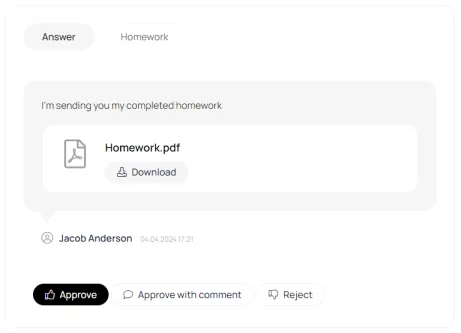
Completed assignments are sent to the teacher for review. They can give a pass or fail grade, leave a comment, and send the work back to the student for revision.
Transparent accruals
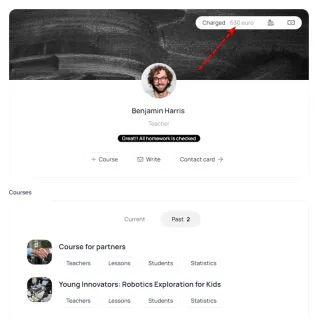
In the teachers' lounge, teachers can see how much they've already been paid for their lessons. This reduces the number of clarifications and disputes.
Educational process
The school operates in a blended format: some classes are held online, others in the classroom. The platform integrates both scenarios.
Distance learning
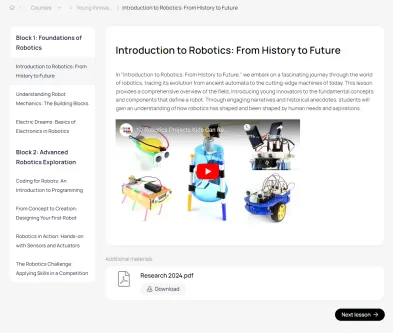
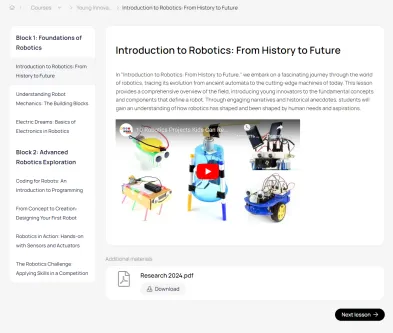
Before an online class, students receive an email with a link to the current lesson. The lesson page contains course materials, homework, and a link to the Zoom meeting.


Work in classrooms
During an in-person lesson, the teacher asks students to open the current lesson page. There, they can see materials, assignments, and additional links and return to them after the lesson.
Communication during the lesson
Students can leave questions and comments in the lesson feed. The history is saved, so the teacher and student don't lose important clarifications after the lesson.
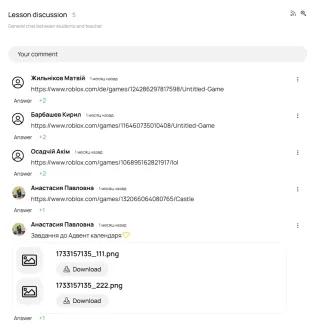
Characteristics of students
At the end of the training, the teacher can write a student's evaluation. This is saved in the student's contact card and helps the school track not only payments and attendance, but also qualitative progress.
Two levels of access for teachers
Head teacher
Creates and edits educational materials, checks homework, invites teachers, and sets up their access rights.
Teacher
Works with students, checks assignments, and performs actions within the granted access rights.
Students
Several training formats
Distance learning course
Students complete their classes online, and all materials are stored on the platform. Each lesson page includes educational content, homework, and a Zoom link. Students and teachers work in a single information space.
Course with classroom classes
Before the lesson, students open the current lesson page and familiarize themselves with the materials. During the lesson, they can leave questions and comments, and after the lesson, the teacher adds to the lesson feed.

Events
The school hosts one-day events: lectures by visiting teachers, master classes, group screenings, and other activities. The administrator creates the event on the platform and sends invitations to the student database.
In the end
IT-UNIVER united four user groups in a single system: administrators, teachers, students, and parents. The school eliminated disparate spreadsheets, separate emails, and manual control. Data on tuition, payments, attendance, communications, and teachers became available in a single platform. The team reduced the number of routine operations, gained transparent processes for staff, and a manageable foundation for further growth and the opening of new branches.

The platform covered approximately 90% of our educational project's business processes. Interaction between administrators, teachers, and students reached a whole new level.
Natalia Protsai, founder of IT-UNIVER
Solutions that were applied at IT-UNIVER
Online school
Blended learning solution: online courses, in-person learning, quizzes, events, knowledge bases, payment options, and a subscription model.
Partner's account
Systematic work with a partner network: training, motivation, maintaining attention, monitoring activity, and developing partners.